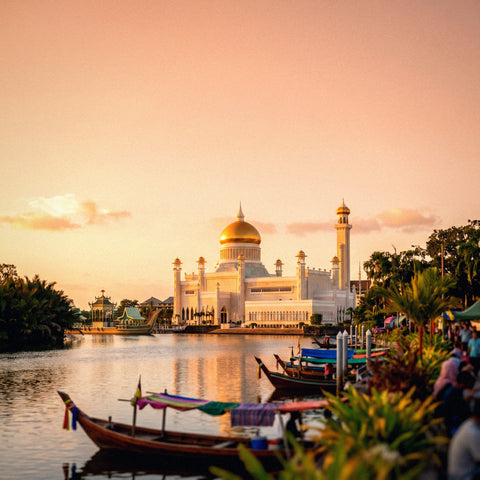
In short: an eSIM for Brunei Darussalam gives you mobile data from the moment you land in Bandar Seri Begawan, without expensive roaming or having to find a SIM card shop. It connects to local networks (DST, imagine, UNN) with solid 4G in the capital; for 2-3 days, 1-2 GB is enough. Install it before you leave home and activate it upon arrival.
Brunei Darussalam is one of those surprising destinations: a tiny sultanate on the island of Borneo, with golden mosques, tropical rainforest, and the floating village of Kampong Ayer perched over the river. To get around without relying on hotel Wi-Fi, an eSIM for Brunei is the most convenient way to have internet from the moment you set foot in Brunei International Airport. This guide covers everything you need: real coverage, local operators, how many gigabytes to get, and some local details not found in typical travel guides.
Is an eSIM worth it in Brunei?
Yes, almost always. An eSIM for Brunei gives you internet as soon as you land, without having to search for a SIM card shop at the airport or show your passport to register, which in Brunei can take longer than you expect due to local bureaucracy. You buy the plan before leaving home, activate it in a minute, and arrive in Bandar Seri Begawan already connected.
The alternative—roaming from your Spanish operator—becomes expensive as soon as you leave the European Union, and Brunei has no agreement to make it cheaper. The other option, buying a local physical SIM, involves queuing, filling out a form with your details, and swapping your phone's card, which is inconvenient if you're only staying a couple of days. With an eSIM, you avoid all that: you keep your Spanish number for WhatsApp and calls, and use the data from your Brunei plan to browse, request a ride, or check the Kampong Ayer map.
That said, be honest with yourself about your itinerary: if your stopover in Brunei is a two-hour technical layover without leaving the international airport area, free Wi-Fi is probably enough, and you don't need to activate anything yet. Save the eSIM for when you actually step outside.

Coverage and local operators
Brunei is a small and highly urbanized country, so mobile coverage in the areas you'll be moving through is solid. The eSIM connects to the networks of the sultanate's local operators, mainly DST (Datastream Digital), imagine (formerly Progresif), and Unified National Networks (UNN), which manages a large part of the country's infrastructure and provides services to the other two.
These are the key coverage points for a traveler:
- Bandar Seri Begawan: The capital has stable 4G/LTE throughout the urban and tourist areas, including the Jame'Asr Hassanil Bolkiah Mosque and the Royal Regalia Museum area.
- Kampong Ayer: The floating village on the river has good signal from the shore and on the wooden walkways; inside some house-museums, the signal might be slightly weaker.
- Brunei International Airport: Coverage from the moment you land, even before passing through passport control.
- Jungle areas and national parks: The signal drops or disappears when you venture into the Ulu Temburong jungle, which is normal in any remote tropical area and doesn't depend on which eSIM you have.
Useful fact: Brunei is one of the countries with the highest per capita income in Southeast Asia thanks to oil and gas, and this is reflected in its telecommunications infrastructure. In the capital, you'll almost always have 4G, which is not as common in other parts of Borneo.
An important nuance that almost no one mentions: Brunei's network does not have automatic roaming agreements with Malaysia, even if you share an island geographically. If you cross the border into Sarawak, your Brunei eSIM will no longer work and you will need another plan; do not assume that it "continues to work a bit" on the other side.
How many GB do you need for your trip?
Brunei is usually visited in a few days—two or three are enough for the essentials of Bandar Seri Begawan—and often as part of a wider trip through Borneo or Southeast Asia. To calculate your data needs, think about maps, messaging, social media, and any last-minute bookings:
| Duration | Intended use | Recommended GB |
|---|---|---|
| 2-3 days (layover) | Maps, WhatsApp, some social media | 1 - 2 GB |
| 4-6 days | Daily browsing, photos, social media | 3 - 5 GB |
| More than a week | Intensive use, video, hotspot | 5 GB or more |
If you watch a lot of video, share your connection with a partner, or use your phone as a hotspot for a laptop, opt for more data. Remember that the eSIM for Brunei Darussalam is rechargable, so if you run out, you can add more gigabytes in a minute without reinstalling anything. A couple of tricks that help extend your plan: download an offline map of Bandar Seri Begawan before leaving your hotel and disable automatic app updates while roaming; in the guide on how to save data while traveling, you'll find more tips that apply here too.

How to activate your eSIM step-by-step
Activating your eSIM is simple and you only need to do it once. Our advice: install it before you leave home using your home Wi-Fi, and have it ready to connect upon landing, without relying on airport Wi-Fi for the process.
- Purchase the Brunei plan and receive the QR (or installation link) instantly by email.
- Scan the QR code from your phone settings or tap the direct installation link.
- Label the eSIM (e.g., "Brunei") to distinguish it from your main SIM and avoid confusion with data usage.
- Upon landing, activate the eSIM data and deactivate roaming for your Spanish SIM before leaving the terminal.
If this is your first time using an eSIM, it's a good idea to review the guide on how to install an eSIM, and if you have questions about the difference between it and traditional roaming or a physical SIM, check out eSIM vs. roaming and international chip vs. eSIM. If you've never used one and don't know where to start, what an virtual eSIM is exactly explains it from scratch.
Myths and what almost no one tells you
There are several things about Brunei that aren't on typical travel advice lists but do affect how you use your mobile phone there:
- The Temburong Bridge changed the rules. Before 2020, to reach the Temburong district, you had to cross Malaysian territory twice by car or boat, with all the roaming hassle that entailed. Since the Sultan Haji Omar Ali Saifuddien Bridge opened, you can go from Bandar Seri Begawan to Temburong by road without leaving Brunei, so your local eSIM won't cut out halfway through your journey as it did for travelers a few years ago.
- Brunei filters some internet content. Due to its conservative rules, some betting sites or adult content may not load on the local network, which doesn't happen with home Wi-Fi. This is not an eSIM fault; it's the country's own network.
- No Grab. Unlike Malaysia, Indonesia, or Thailand, transportation with apps in Brunei uses its own local platforms, not the pan-Asian apps you might already have installed. Without active data, you can't order a car from your hotel, so activate your eSIM before you need to move, not when you're already at the door with your luggage.
- Friday changes schedules. It is the holy day, and many shops and offices close at midday for prayer. If your eSIM is active, the calendar and maps will notify you of these closures before you find yourself in front of a closed shutter.
- Kampong Ayer is best explored with your phone in hand but protected. The wooden walkways are narrow and there's humidity everywhere; keep your phone in a waterproof case if you're taking photos near the river, not just for the phone itself, but because that's where most people lose connection in the rush to put it away incorrectly.
Brunei as part of a Southeast Asia itinerary
Few people travel only to Brunei: it's common to combine it with Malaysia (the states of Sabah and Sarawak are on the same island of Borneo) or with a longer trip through Southeast Asia and the Pacific. If this is your case, be aware that the Brunei eSIM only covers Brunei: as soon as you cross the border, you'll need another profile or a plan that covers multiple countries.
If you plan to travel through many countries consecutively and are still unsure about the difference between your operator's roaming and an eSIM for data, the guide on what data roaming is clarifies the basic concept before you decide how to organize connectivity for the rest of your trip.
Practical tips on the ground
Brunei has its own cultural peculiarities that should be kept in mind, and some directly affect how you use your phone and connection:
- It's a conservative Muslim country: prohibition is enforced (alcohol is not sold), and there are dress codes in mosques, with clothing available for loan at the entrance if you don't have long sleeves. Keep maps and visiting hours handy to organize yourself well and avoid arriving at an inconvenient time.
- Currency: the Brunei Dollar (BND), which is pegged to the Singapore Dollar and is interchangeably accepted in many shops.
- Type G plugs (the same as in the UK): bring an adapter to charge your phone; don't assume the hotel will lend you one.
- Download offline maps of Bandar Seri Begawan before you go, in case you venture into areas with less signal or simply to avoid unnecessary data usage for continuous navigation.
- Be careful with open public Wi-Fi networks in shopping centers or the airport: if you're doing anything with sensitive data, it's better to use your eSIM data directly than to connect to an unsecured open network; in the guide on eSIM, VPN, and travel privacy, we explain this in more detail.
With an active eSIM, you'll always have a translator, maps, and reservations on hand, which is very useful in a destination where Spanish is rarely spoken and Western tourism is still scarce compared to other parts of Southeast Asia.
Frequently asked questions
Does the eSIM work immediately upon landing in Brunei?
Yes. If you install it before traveling, upon landing at Brunei International Airport, you just need to activate the eSIM data, and it will connect to the local network in seconds. You don't need to look for a store or register with your passport. Remember to disable roaming on your Spanish SIM to avoid extra charges in the meantime.
Which operators does the eSIM use in Brunei?
The eSIM relies on the networks of local operators, mainly DST (Datastream Digital) and imagine (formerly Progresif), on UNN infrastructure. You don't manually choose the operator: the system connects to the best available network in each area to give you the most stable signal possible.
How many GB do I need for a few days in Brunei?
For a short visit of 2 or 3 days with maps, messaging, and some social media, 1 or 2 GB is more than enough. If you're staying for a week or using video and sharing your connection, 5 GB or more is better. Since the eSIM is rechargable, you can always add more gigabytes if you run out without installing anything new.
Do I keep my Spanish number with the eSIM?
Yes. The Brunei eSIM only provides data; your Spanish number remains active on your primary SIM or eSIM for receiving WhatsApp, SMS, and calls. It is recommended to use the eSIM's data for browsing and to disable data roaming on your Spanish line to avoid excessive charges.
Can I use the same eSIM in Malaysia or the rest of Borneo?
The Brunei eSIM only covers Brunei: it does not have a roaming agreement with Malaysian networks, even if you share an island. If your route includes Sabah, Sarawak, or other Southeast Asian countries, you will need a different plan or profile for that part of the trip, and activate it as soon as you cross the border.
Do I need an eSIM if I only have a layover at Brunei airport?
If you're not leaving the airport's international zone, probably not: the terminal's free Wi-Fi is usually enough for a couple of hours of waiting. The eSIM makes sense as soon as you plan to move around Bandar Seri Begawan, request a car, or browse without relying on an open network.
Is there free Wi-Fi in Brunei so I don't need data?
Some hotels, shopping malls, and cafes in Bandar Seri Begawan offer Wi-Fi, but its coverage and speed are inconsistent, and it won't help you get around town, request a ride, or check the map in real time. An eSIM gives you continuous connection wherever you are, not just within a specific establishment.
Conclusion
Brunei Darussalam is a small but fascinating destination, and staying connected makes it easier to navigate a country where Western tourism is still rare and the apps you use in the rest of Southeast Asia don't always work the same way. With an eSIM, you'll have maps, a translator, and reservations from day one, without queues or expensive roaming. Activate your eSIM for Brunei in a minute and land in Bandar Seri Begawan with internet ready to use.