In short: An eSIM Uganda gives you mobile data from Entebbe Airport, without roaming or queues to register a physical SIM. It covers Kampala, Entebbe, and Jinja well; in parks and during gorilla trekking, the signal is irregular or nonexistent, so it's advisable to download maps before heading into the jungle.
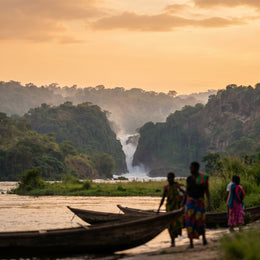
Uganda is the Pearl of Africa, and the nickname is not mere tourist advertising: mountain gorillas in Bwindi, chimpanzees in Kibale, the source of the Nile in Jinja, and tree-climbing lions in the Ishasha sector within Queen Elizabeth National Park. It's a country explored in stages, with long transfers between parks and lodges that are often hours away from the nearest city. In this context, having data from the moment you land in Entebbe changes the trip: you can confirm transfers, report delays, or locate the meeting point with your guide without relying on the accommodation's Wi-Fi, which is often weak or nonexistent outside Kampala.
Is an eSIM for Uganda worth it?
Yes, and the reason is not just the savings compared to roaming. It's pure logistics: on a safari, you change areas almost daily, and between Kampala, Jinja, Kibale, and Bwindi, a phone shop isn't always handy to buy a local SIM. With an eSIM, you arrive with data already working from the moment the plane lands in Entebbe, so your first WhatsApp message to the lodge, transfer confirmation, or finding the pickup point doesn't depend on finding Wi-Fi at the terminal.
There's a prerequisite that many people forget: your mobile must be eSIM compatible and unlocked by your Spanish operator. If you're not sure, check it before buying anything; we explain what your mobile needs in what an eSIM is. And if you're coming from a flight with a long layover in Europe—many connections to Entebbe pass through Amsterdam, Brussels, or Istanbul—a Europe eSIM plan will solve those airport hours without touching the line you'll use in Uganda.

Coverage: MTN and Airtel in parks and cities
Uganda relies on two operators, MTN Uganda and Airtel Uganda, which together provide good coverage in cities and main access routes to parks. The eSIM automatically connects to the network with the best signal at each point, without you having to manually select or worry about which is which. In Kampala, Entebbe, and Jinja, 4G runs smoothly for maps, messaging, and uploading photos without issues.
Things change as you move away from the city. In the access areas to Bwindi Impenetrable Forest and Kibale, the signal is intermittent: sometimes you have decent 3G at the lodge and sometimes nothing, and it depends a lot on the exact spot you are standing, not just the general area. Inside the forest, during gorilla trekking, it is completely normal to lose coverage for hours—sometimes the entire excursion—because these are dense and remote jungles with few antennas. It's not an eSIM fault: no network, physical or virtual, reaches there.
| Area | Typical Coverage | What you can do |
|---|---|---|
| Kampala and Entebbe | Good 4G | Everything smoothly: maps, video, social media |
| Jinja (Source of the Nile) | Good 4G | Maps, messaging, upload content |
| Access to Bwindi / Kibale | Irregular 3G/4G | Messaging yes; streaming, not reliable |
| Queen Elizabeth NP (tracks) | Intermittent | Coverage in sections, depending on the spot |
| Trekking deep in the forest | Almost null | Download everything before entering |
A trick almost no one uses: activate airplane mode during trekking and turn it on briefly when you reach a clearing or the summit; sometimes a signal bar slips through just long enough for a pending message to send, and this way you don't drain your battery searching for a network where there isn't one. In a country where charging your phone at a remote lodge might depend on a generator that switches off at night, battery life is as important as data.
How many GB to take for a safari
A safari uses less data than one might imagine before leaving: you spend most of the day watching animals, not the screen, and trekking hours pass without coverage. For a one-to-ten-day trip with maps, messaging, social media, and a few photos uploaded at night from the lodge, 5 to 7 GB will be more than enough. If you plan to make regular video calls or work remotely between stages—something increasingly common among those combining safari with remote work—calculate 10 GB to be on the safe side.
- Short getaway (4-5 days, Kampala + Jinja): 3 GB covers the essentials comfortably.
- Classic one-week safari (Bwindi, Kibale, Queen Elizabeth): 5 GB, uploading photos at night when there's Wi-Fi or good signal.
- Two weeks or remote work between stages: 10 GB, with room for video calls and higher consumption days in the city.
Since there's hardly any signal in the parks, much of your actual consumption is concentrated in Kampala, Entebbe, and on road trips, not in the jungle. If you want to fine-tune the calculation according to your usage type, you'll find details in how to save data abroad, with tricks that apply equally to a safari or any long trip.

eSIM, roaming or local SIM: what's best value
Uganda is outside the EU, so your Spanish plan's roaming costs will skyrocket as soon as you activate data: it's non-EU roaming, the most expensive kind, and the cost can quickly accumulate on a two-week trip. Before assuming you need to buy something, check your contract: if your operator includes Uganda in an international package you already pay for, there's no point in duplicating expenses. If it doesn't include it—which is common—then a local SIM and an eSIM come into play. If you want to understand where that extra cost comes from, we explain it in detail in what data roaming is.
A local SIM from MTN or Airtel is cheap for data, but in Uganda, it's linked to your identity: registration requires a passport and must be done at a physical point of sale, a process that can take a good while at the airport right after a long flight, when all you want is to get to your hotel. Also, while using it, you lose your Spanish number for bank SMS or urgent calls, unless you carry two phones. We compare both options in depth in international chip vs. eSIM.
The eSIM gives you what you're looking for from both: a fixed price before traveling, zero paperwork at your destination, and your Spanish line intact for banking, without having to shuffle two physical cards. For a detailed comparison with numbers, see eSIM vs. roaming.
Where it's NOT worth it: if your layover in Entebbe is only a few hours and you don't leave the transit area, you don't need anything, airport Wi-Fi is usually sufficient. And if your company already provides you with a line with active international data for Uganda, check that option before buying anything else.
Myths and what almost no one tells you
There are circulating ideas about staying connected while traveling in Uganda that need clarifying before you go:
- "With an eSIM, I don't need to carry my passport." False. An eSIM frees you from registering a physical SIM, but you still need your passport to enter national parks, for gorilla permits, and for any road checks, which are frequent on routes between parks in Uganda.
- "If I have an eSIM, I don't need Wi-Fi at the lodge." Not always. Many safari lodges are surrounded by hills or dense forest that block mobile signal, even if the lodge has its own satellite Wi-Fi. Sometimes the accommodation's Wi-Fi works better than mobile data, and sometimes vice versa: it's prudent not to rule out either.
- "In Kampala, the connection is always good." Generally yes, but Kampala's traffic is among the densest in East Africa, with boda-bodas (motorcycle taxis) navigating constant jams; during peak hours, the data network also gets saturated because there are many users concentrated in a small area, so a map might take longer to load than expected precisely when you need it most to guide your driver.
- "Gorilla trekking can be planned on the fly with a mobile phone." No: gorilla permits are limited and booked in advance, usually through an agency or wildlife authority. An eSIM helps you confirm and coordinate, not improvise the day before.
- A detail not found in guidebooks: In Jinja, near the source of the Nile, there are stalls selling Ugandan "rolex"—a chapati rolled with an omelet, nothing to do with the watch; it's the perfect reference for ordering street food without needing to translate anything, and a good time to take advantage of the good coverage in the area to upload content before hitting the road to areas with less signal.
Safety, health and connectivity for a worry-free trip
Uganda, within organized tourist circuits, is a consolidated destination, and being connected adds real peace of mind: you can share your location with family, consult official advisories, or message your guide without relying on the accommodation's Wi-Fi. Some practical notes to have sorted before leaving home:
- Download offline maps of your stages and save the safari operator and lodge contacts before losing coverage on the road.
- Check current travel recommendations and have your yellow fever certificate handy: it is usually requested upon entry into Uganda, so confirm it with your international vaccination center in advance.
- WhatsApp is the tool used by guides and lodges to coordinate schedules and pickups; have your profile already installed before flying to avoid wasting time at the airport.
- If you plan to do banking or make payments from your phone on shared lodge Wi-Fi networks, review how to protect your privacy with a VPN abroad: in accommodations with open Wi-Fi for all guests, it's an extra layer that's not out of place.
- If your African route extends beyond Uganda, check the coverage of your next destination well in advance before finalizing your plan.
With connectivity sorted beforehand, what occupies your mind during the trip are the gorillas and the Nile, not whether you'll find coverage.
How to install and activate your eSIM
Everything is done from your mobile, without shops or technical knowledge. The recommendation is to install the profile at home with Wi-Fi, before checking your luggage, and leave data activation for when you land in Entebbe.
- Purchase the eSIM and receive the QR code by email instantly.
- Scan it from your phone settings with Wi-Fi at home; step-by-step instructions are in how to install an eSIM.
- Configure the eSIM as a data line and leave your Spanish SIM active only for calls and SMS.
- Upon landing in Uganda, activate data roaming only on the eSIM.
- Check that your mobile connects to MTN or Airtel, and you'll have internet.
If something doesn't work out—the profile doesn't install, no network appears, the phone doesn't switch data lines—Spanish support is available throughout your trip to resolve it without having to find a store in Kampala.
Frequently Asked Questions
Is it safe to travel to Uganda, and does being connected help?
Uganda is a consolidated tourist destination within organized tours. Being connected helps: you can check official advisories, share your real-time location, and coordinate with guides if plans change. Review current travel recommendations, have your vaccinations and certificate up to date, and avoid moving through border areas that are temporarily advised against.
Does the eSIM work in gorilla and chimpanzee parks?
In access areas and most lodges, you usually have some signal, but during trekking deep in Bwindi or Kibale forest, it's normal to lose coverage for hours. This is not an eSIM problem: there are hardly any antennas from any operator there. Download maps and confirmations before entering and you will regain signal when you leave the park.
How many GB do I need for a one-week safari in Uganda?
5 GB is plenty for a week with maps, messaging, social media, and uploading photos at night. Since there's little signal in the parks, actual consumption is concentrated in cities and on road trips. If you plan to work remotely or make frequent video calls, increase to 10 GB to be safe.
Do I need to register the eSIM with my passport upon arrival in Uganda?
No. Unlike Ugandan physical SIMs, which are linked to your identity and require in-person registration with a passport at a point of sale, an eSIM does not require any formalities at your destination. You only need a compatible and unlocked mobile phone: you install the profile at home and activate data upon landing in Entebbe, without queues after your flight.
Can the eSIM be used inside safari cars or vans?
Yes, without a problem, as long as there is coverage in the area you are driving through. On open tracks in Queen Elizabeth, there is usually intermittent coverage in sections; in forested areas or between parks, it is common to lose the signal for a good while until you reach the next area with an antenna.
Which operator does my eSIM use in Uganda, MTN or Airtel?
The eSIM automatically connects to the network with the best available signal at each point, without you having to manually select. In practice, this means you can switch from MTN to Airtel depending on the area without noticing or losing connection significantly.
Do I need lodge Wi-Fi if I already have an eSIM?
It's advisable not to rule it out. Some safari lodges are in areas where the terrain blocks mobile signal even if they have their own satellite Wi-Fi, and vice versa in other cases. Arriving with both options available—eSIM and accommodation Wi-Fi—is the safest way to ensure you don't lose connection any day of your trip.
Conclusion
Uganda is best enjoyed with logistics sorted beforehand: confirming the lodge, reporting a delay, or sharing a gorilla sighting without needing to search for Wi-Fi. An eSIM gives you data from Entebbe, keeps your Spanish number intact for banking, and saves you from both the paperwork of a local SIM and the soaring costs of non-EU roaming. Install it before you fly and dedicate your trip to what matters: the gorillas, the Nile, and the Pearl of Africa, not coverage.