In summary: the eSIM for Cusco is actually a Peru eSIM that you activate upon landing at Alejandro Velasco Astete Airport (CUZ) or in Lima if you have a layover. It provides good signal in the historic center and the Sacred Valley, but coverage is limited in Machu Picchu and high-altitude treks: download maps and tickets before ascending.
What is the eSIM for Cusco and how does it work?
There is no exclusive eSIM for the city of Cusco: you buy a Peru eSIM, a single profile that works throughout the country, and you use it the same way in Cusco, in Lima if you have a layover, or in Arequipa if you extend your trip. The only thing that changes depending on your route is how many GB you need, not the type of eSIM. This is the same for almost any data roaming: the local operator charges by country, not by the specific city you are in.
Technically, the eSIM relies on the networks of Peruvian operators — Claro, Movistar, Bitel, and Entel — so the quality of the connection in Cusco depends on the same infrastructure that any physical card purchased at the airport would use. The difference is that you install it calmly at home with Wi-Fi before you leave, and you don't have to look for a store or stand in line as soon as you land.

Landing connected: airport and layover in Lima
The routine is simple: you install the eSIM profile in Spain with Wi-Fi, and you only activate the data when you set foot on Peruvian soil, either at Jorge Chávez Airport in Lima if you have a layover, or directly at Alejandro Velasco Astete Airport in Cusco (CUZ code) if you fly non-stop. As soon as you activate it, you have coverage to order an official taxi, open the map to your hotel, and let people know via WhatsApp that you have arrived safely.
This is more important in Cusco than in most destinations because the city is at 3,400 meters and the body starts to feel it as soon as you get off the plane. The last thing you want to do is struggle with a SIM card vending machine or stand in line at an airport module with a heavy head from the altitude. With an eSIM, you turn on your phone, activate the Peru profile, and you're done: you'll need the energy you save there to acclimatize during the first few hours.
Tip: book and download your train ticket to Aguas Calientes to your phone before leaving home. Coverage on the journey is irregular, and having the document offline will save you trouble at the platform.
Coverage in the historic center and the Sacred Valley
In the historic center of Cusco, the 4G signal works well: the Plaza de Armas, the Qorikancha, Hatun Rumiyoc street with its famous twelve-angled stone, and the San Blas neighborhood — steep, with narrow streets and Inca walls — have stable coverage most of the time. It's in the narrower streets of San Blas, between thick stone walls, where the signal sometimes drops a couple of bars; nothing that a few steps towards a more open street won't solve.
In the Sacred Valley — Pisac, Ollantaytambo, Urubamba, Chinchero — there is coverage in the towns and along the main road, but in the mountain stretches between them, and on walks away from the asphalt, the signal easily drops. If your plan includes traveling throughout Peru and not just Cusco, you should check the complete guide to the Peru and Machu Picchu route, which details what to expect from the connection at each stage, section by section.

Machu Picchu, the Inca Trail, and the Rainbow Mountain
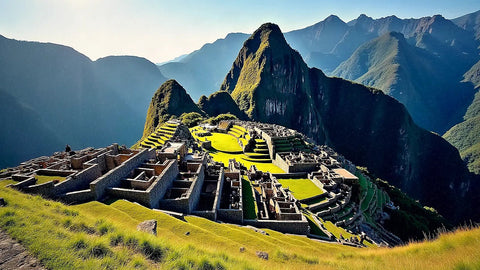
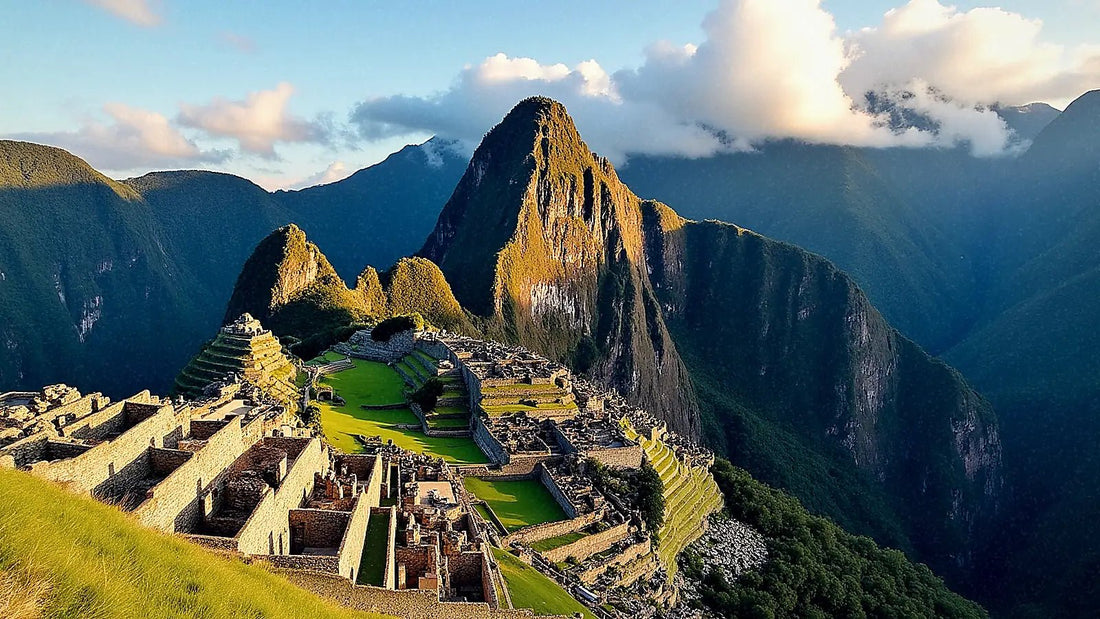
In Machu Picchu, coverage is limited and very irregular. Aguas Calientes, the town at the foot of the citadel, usually has a reasonable signal because it concentrates hotels and shops, but on the bus ride up, inside the archaeological site, and at the high viewpoints, the connection easily disappears. This is not a problem with your eSIM: no card, local or international, has better coverage there, because the telecommunications infrastructure simply does not reach that protected mountain area with strength.
If you're doing the classic four-day Inca Trail, assume you'll spend entire sections without a single bar. Porters and guides carry radios or satellite phones for real emergencies; your mobile, in that context, is a camera and a watch. The same goes for the Rainbow Mountain (Vinicunca): the climb up to 5,000 meters crosses totally isolated areas, with intense cold that also drains the battery faster than usual. Download the route, tickets, and any documents before leaving the hotel that morning, because once you're up there, you won't be able to solve anything online.
The practical recommendation, both for Machu Picchu and for Vinicunca or the South Valley (Tipón, Pikillacta, Rumicolca), is the same: download the offline map on Google Maps or Maps.me the night before, save tickets in your photo gallery as well as in your email, and don't rely on having data at the exact moment you need it.
How many GB do you need depending on your route?
Cusco is best enjoyed by looking at the city rather than at your phone, and much of the time you'll be in areas without coverage due to the geography itself, so actual consumption is usually lower than one fears before traveling. This table serves as a reference depending on how long you stay and what excursions you include:
| Plan | Days | Approximate GB | Ideal for |
|---|---|---|---|
| Express | 2-3 | 3 GB | Cusco city and a day trip |
| Classic | 4-6 | 5 GB | Cusco + Sacred Valley + Machu Picchu |
| Complete | 7-10 | 8-10 GB | Peru combined with Lima or Arequipa |
| Nomad | 10+ | 12+ GB | Occasional remote work and video calls |
If your itinerary includes several overnight bus legs, constant maps, and some remote work between excursions, move up a notch in the table; if you're really going to disconnect, the express plan is usually more than enough. To calculate in more detail according to your consumption habits (maps, streaming, video calls), the guide on tricks to save data while traveling has specific adjustments that extend any plan, such as lowering video quality on social media or preloading the entire city map instead of loading street by street.
Altitude, soroche, and why your phone matters more than usual
Cusco is over 3,400 meters high, and soroche — altitude sickness — is real and doesn't affect everyone the same way: some get a headache on the first day, others nothing, and some are hit on the second day when they least expect it. In that context, your mobile phone is no longer just a map or a camera: it's your way to alert someone if you feel unwell, order a taxi back to the hotel without walking too much, or locate the nearest pharmacy at three in the morning.
That's why it's advisable to arrive with active data and a fully charged battery from minute one, without relying on finding Wi-Fi just when you need it. The cold nights in the mountains, especially if you sleep in the Sacred Valley or climb above 4,000 meters on an excursion, drain the battery faster than usual: carrying a charged power bank is not a whim, it's common sense in this destination.
A couple of habits that make a difference: download the Sacred Valley routes on the offline map before leaving the hotel, and save your Machu Picchu tickets both in your email and as a screenshot. That way, even if you lose coverage in the middle of the mountains, you still have the essentials at hand without relying on the network.
eSIM or physical SIM in Cusco: the honest comparison
In the center of Cusco, especially near San Pedro market, you’ll find stalls selling Claro or Movistar physical SIM cards. It’s a valid option, but it comes with friction that eSIM avoids: usually, they ask for your passport to register the line (it’s a Peruvian legal requirement, not a whim of the seller), you have to wait in line, and if your phone has a dual physical SIM, you might have to remove the tray and lose sight of your Spanish card for a while. With an eSIM, you don’t touch your physical SIM at all: it stays in your phone receiving SMS from the bank while the Peruvian data profile works in parallel.
Compared to your Spanish operator's roaming, the difference is even clearer. In Peru, roaming outside the European Union is charged at high prices per megabyte if you don't have a specific plan, and those plans usually offer less margin than you might think for a trip with constant maps and photos. An eSIM, on the other hand, gives you a pre-defined block of GB, with no surprises upon your return. You can see this in more detail in the eSIM vs. roaming comparison, which clearly explains why so many travelers change their minds after the first surprise bill.
That said, if your trip to Cusco lasts less than 48 hours and you'll mostly be in your hotel or using café Wi-Fi in the city center, you probably won't even need to spend on data: the Wi-Fi at your accommodation and some local establishments in the historic center are usually sufficient for basic needs. eSIM makes more sense when you're on the move, doing excursions, or constantly need a map outside Wi-Fi zones.
How to install the eSIM before flying
The process doesn't require you to remove your Spanish SIM card at any point and takes just a few minutes from home:
- Check that your mobile supports eSIM (most recent models do).
- Purchase the Peru eSIM and receive the QR code by email in seconds.
- Scan it from your phone settings, with Wi-Fi, before leaving home or your hotel.
- Upon landing in Cusco or Lima, activate the data from the Peruvian profile.
If this is your first time installing an eSIM and you want to see it step by step with screenshots, the guide on how to install an eSIM details it screen by screen according to your mobile model, whether it's an iPhone or Android.
Myths and what almost no one tells you
"Altitude spoils the eSIM." That's not true: the eSIM is a digital chip, it's not affected by altitude. What does happen above 4,000 meters is that there are fewer antennas and the terrain is more complicated, so coverage drops for the same reason it would with any physical card: lack of infrastructure, not a device problem.
"If I buy a physical SIM at Cusco airport, it will be cheaper." Sometimes yes, sometimes no, and you also waste time at the moment you least want to wait in line due to the altitude. The real advantage of eSIM is not just the price: it's arriving already connected and not having to rely on finding an open module with stock.
"On the train to Machu Picchu, I'll be able to work or make video calls." The journey runs alongside the Urubamba River between mountains, and coverage comes and goes without warning. Download what you need before getting on the train; don't count on a stable connection during the journey, whether it's Vistadome or expedition service.
"The more eSIM I buy, the less risk I take." It's the opposite of what it seems: in Cusco, most connection problems don't come from running out of GB, but from areas without physical coverage where no GB in the world will connect you. Spending more on data doesn't solve an infrastructure problem; downloading content offline does.
"In San Blas, the signal is always bad because of the hills." It's not the slope, it's the thickness of the Inca and colonial walls. If you notice it cutting out in a specific alley, walk twenty meters towards a wider street and you usually regain the signal immediately.
Frequently Asked Questions
Is there coverage in Machu Picchu with an eSIM?
In Aguas Calientes there is usually reasonable signal, but inside the citadel and on the bus ride up, coverage is very limited and irregular, just like with any local Peruvian card. Download tickets and offline maps before going up, because you won't be able to sort it out once you're there.
Can I use the same eSIM in Lima and Cusco?
Yes. It is a Peru eSIM valid throughout the country, so you can use it in Lima, Cusco, the Sacred Valley, or Arequipa as long as you have data balance, without changing profiles or reinstalling anything.
Is it useful for booking the train and Machu Picchu tickets from my phone?
Yes, as long as you have coverage. In downtown Cusco, you can browse without problems to book train or tickets, but it is advisable to do so in advance because the signal frequently fails both on the train journey and in the citadel.
When should I activate the eSIM so I don't use up extra days?
Install it calmly in Spain with Wi-Fi, and only activate the profile data upon landing in Peru. Installing does not consume the plan; the day counter starts when you connect to the Peruvian network for the first time, not before.
Do I need a VPN to use the eSIM in Cusco?
Not for normal browsing of maps, messaging, or bookings. A VPN is advisable especially if you are going to connect to public Wi-Fi networks in hostels or cafes with sensitive data, such as online banking. You can see when it makes sense in the guide to VPN and privacy while traveling.
What if my flight has a long layover in the United States before arriving in Peru?
It is common to fly from Spain to Cusco with a layover in Lima, but there are also routes with connections in cities in the United States. If your layover there is long and you want to have data during those hours at the airport or city, you can activate the eSIM for the United States separately before installing the Peru one.
Can I continue to use the same logic if I continue my trip through South America after Peru?
Yes, but you need a new eSIM for each country: the Peru eSIM does not work outside its borders. If your route continues to Colombia, for example, the eSIM for Colombia guide will help you with Medellín, Bogotá, and Cartagena using the same criteria you used in Cusco.
Conclusion
Cusco asks you to arrive calmly, let your body acclimatize, and enjoy the Andean pace without rushing. Landing with active data removes a worry from your mind from the very first minute: taxi, map, and a message home sorted without looking for shops with a heavy head from the altitude. The eSIM gives you reliable connection in the city and the Sacred Valley, with the common sense to assume beforehand that Machu Picchu, the Inca Trail, and the Rainbow Mountain have little or no signal due to pure geography, not any data profile failure. Download important things offline, carry a power bank, and let your phone do its job only where it truly can.