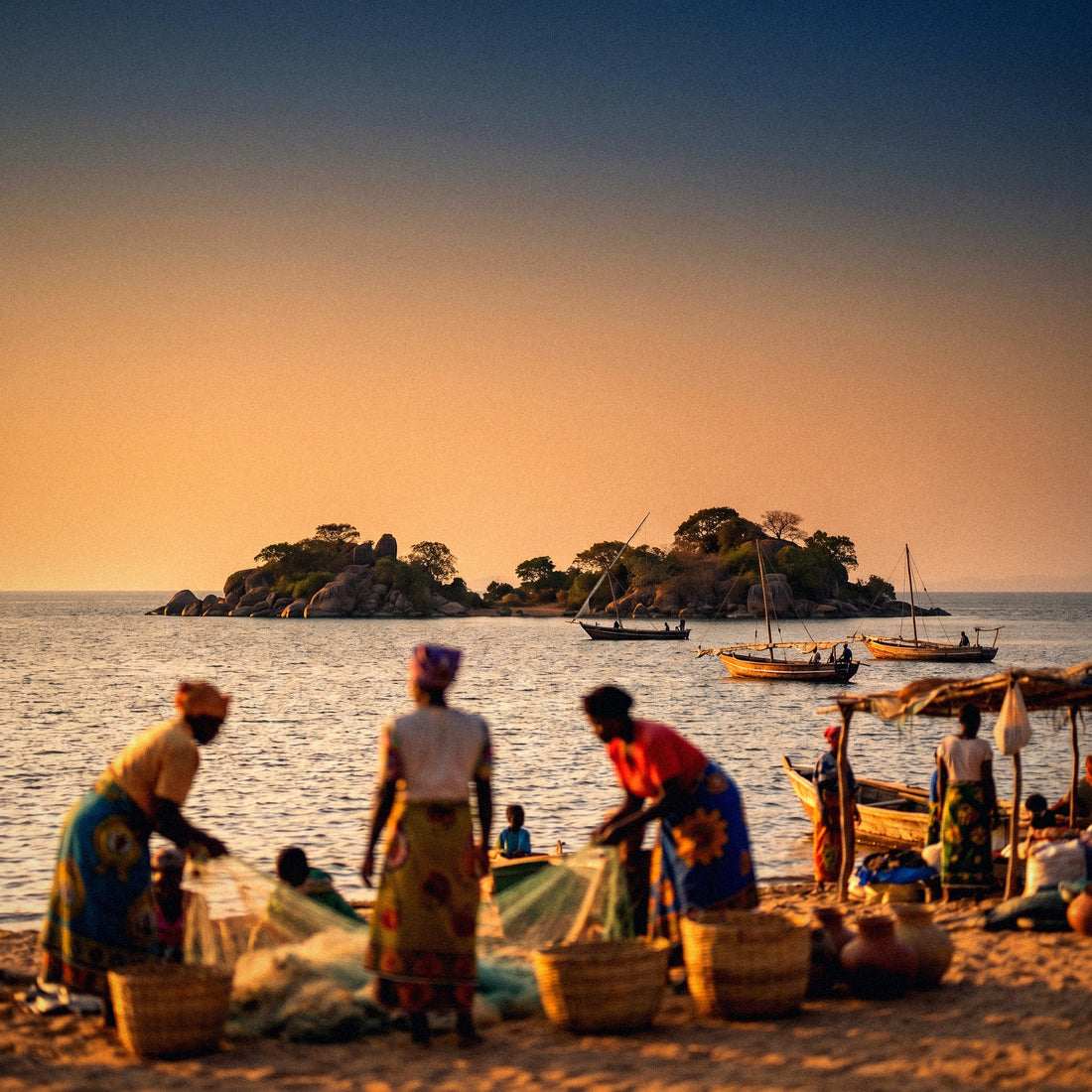
Malawi is called "the warm heart of Africa," and after traveling through it, you understand why: a huge lake full of colorful cichlids, people waving to you from the roadside, and prices that still allow you to travel without taking out a mortgage. What the brochures don't tell you is that connectivity varies by area: in Lilongwe or on the shore of Nkhata Bay, you'll have good signal, but in Mulanje or inside a park, you'll be alone with the landscape. Here, I'll explain how the internet really works in Malawi, how much each option costs, and what I would do if I were to catch that flight again tomorrow.
What is the coverage like in Malawi?
In Malawi, you can connect with a travel eSIM activated before flying, or with a local SIM from Airtel or TNM purchased with your passport. There is 4G in cities and a good part of the lake shore, patchy signal in parks, and practically none on Mount Mulanje.
Malawi is a small, elongated country, with the population concentrated in the Lilongwe–Zomba–Blantyre corridor and in the lakeside villages. Antennas are where people are, so the logic of coverage is easy to anticipate: where there's a market, there's a signal; where there's a nature reserve or mountain, there's silence.
The two networks that matter are Airtel Malawi and TNM (Telekom Networks Malawi), regulated by MACRA. Both provide 2G almost nationwide, 3G in urban and semi-urban areas, and 4G/LTE in large cities—Lilongwe, Blantyre, Mzuzu, Zomba—and tourist hubs on the lake. 5G exists on paper in very specific locations, but don't count on it for anything.
The actual speed you'll see is modest: in urban centers, it's around 10–20 Mbps when the network isn't saturated, and drops to 1–5 Mbps in rural areas. This is sufficient for WhatsApp, Maps, email, and uploading photos with patience; just enough for long video calls, and not ideal for high-quality streaming. If you plan to work remotely from Malawi, expect evenings to be worse than mornings, and that a power outage—which do occur—can bring down the antenna in your area for a while.
The four ways to get connected, compared
When you land at Kamuzu Airport in Lilongwe, you have exactly four options, and it's best to decide before leaving home because one of them can only be prepared from abroad. I'll lay them out for you plainly, with the pros and cons of each.
| Option | Estimated Cost | When it pays off | The catch |
|---|---|---|---|
| Roaming from your Spanish operator | Daily bundles in double-digit euros; without a bundle, individual megabytes are very expensive | 2–3 day business trips where the company pays | Malawi is outside the EU: no "like at home" rates |
| Hotel or lodge Wi-Fi | Included or paid in lake lodges | For downloading maps and sending photos at night | Many lodges use satellite: slow, rationed, and no coverage outside the bar |
| Local SIM (Airtel / TNM) | SIM costs about 500 MWK; bundles from around 2,500 MWK | Long stays and for those who need a Malawian number for mobile payments | Passport registration, queues, and top-ups at kiosks |
| Travel eSIM | Purchased in euros before flying | Practically all tourist trips | Requires a compatible and unlocked mobile phone |
To sum it up in one sentence: the eSIM vs. local SIM battle comes down to how much you value your first morning of travel. If you have plenty of time and want a local number to use Airtel Money or Mpamba, buy a SIM. If you prefer to leave the airport with data already working and without explaining your passport to anyone, the choice is clear. And if you've never used one, here's what an eSIM is exactly and how to install it, which is simpler than it sounds.
Wi-Fi and roaming, however, are not strategies: they are patches. One ties you to the lodge, and the other ties you to the bill.
Spanish roaming in Malawi: outside the EU and expensive
Here, I need to be clear to save you from an unpleasant surprise: Malawi does not belong to the European Union or the European Economic Area, so the "Roam Like at Home" regulation—which allows you to use your gigabytes in Portugal or Italy as if you were in Madrid—does not apply. Nor is it an outermost region or anything similar. Malawi falls into the most expensive zone in the world for almost all Spanish mobile plans.
What does this mean in practice? If you get off the plane with mobile data turned on and without having contracted anything, your operator will start charging you per megabyte at international zone prices. I won't give exact figures because each company has its own and they change, but the pattern is consistent: daily bundles for Africa usually range from ten to twenty euros per day for a few hundred megabytes, and off-bundle consumption is counted in euros per megabyte. An afternoon of Google Maps and WhatsApp with videos could cost you more than your accommodation.
The roaming bill doesn't arrive on the day of your trip: it arrives three weeks later, when you've already forgotten that you left your phone syncing photos at the airport.
If you still want to use your operator, do two things before boarding: call and confirm in writing what bundle covers Malawi and at what price, and deactivate data roaming until you have it contracted. I'll give you the cold hard numbers in this comparison of how much international roaming costs and in this analysis of eSIM vs. roaming. Spoiler: for a destination like this, the difference isn't 20%, it's an order of magnitude.
Lodge and hotel Wi-Fi: satellite and short rations
Wi-Fi exists in Malawi, but you need to understand where it comes from. In Lilongwe and Blantyre, urban hotels use fiber or radio links and work reasonably well: you can work a morning without drama. As soon as you move to the lake or the parks, the story changes. Many lodges in Cape Maclear, Nkhata Bay, Likoma, or the camps in Liwonde and Majete connect via satellite or a 4G router pointing to the nearest village's antenna, and that bandwidth is shared by all guests.
Translated: lodge Wi-Fi is usually a communal resource. It works well at seven in the morning and crawls at nine at night, when fifteen people are trying to upload their sunset photos at once. Some places limit it to the bar or dining area, and in a few, you'll see quotas per device or per megabyte. There are also beautiful lodges that explicitly advertise "no Wi-Fi" as a selling point, and honestly, they're not wrong.
What you'll never have via Wi-Fi is a connection while you're on the move: not on the minibus to Monkey Bay, not on the Ilala ferry, and not when you arrive in a village at nine at night looking for accommodation. That's why Wi-Fi works as a complement—downloading offline maps, making a long video call from the bar—and not as a primary plan. If you were considering renting a portable router, first check out this comparison of eSIM vs. pocket Wi-Fi: in Malawi, one more device to carry and that you could lose rarely pays off.
Local SIM: TNM and Airtel, prices and paperwork
Buying a local SIM in Malawi is perfectly feasible and quite cheap in euros, but it requires time and a passport. SIM card registration is mandatory: at the store, they'll ask for your ID, take a photo or register your details, and activate the line. You can buy them at official Airtel and TNM stores in cities, at airports, and at many street kiosks; I recommend an official store, because on the street it's easy to end up with a poorly registered SIM that stops working after a few days.
The card itself costs pennies, around 500 MWK. What matters are the data bundles. These are the approximate prices I had in mid-2026, after MACRA authorized a 26% average increase in voice and data rates in June, which both operators applied:
| Typical Bundle | Data | Approx. Price (MWK) | Approx. Equivalent |
|---|---|---|---|
| Basic weekly | 1–2 GB / 7 days | 2,500 | ~€1.25 |
| Small monthly | 3.6 GB / 30 days | 7,700 | ~€4 |
| Medium monthly | 6 GB / 30 days | 10,500 | ~€5 |
| Large monthly | 10 GB / 30 days | 17,050 | ~€8.50 |
| XL monthly | 15 GB / 30 days | 19,000 | ~€9.50 |
Two honest warnings. First: these prices fluctuate, and in Malawi, they tend to go up—June 2026 wasn't the first increase—so take them as a reference and not a fixed rate. Second: the kwacha exchange rate is slippery territory, and the official rate and what you're offered on the street don't always match, so those euro equivalents are approximate. For local pockets, by the way, these bundles are expensive: an average Malawian spends a significant portion of their earnings on data.
eSIM: what I use and why
My routine for Southern Africa is always the same: I buy the eSIM at home, install it using my living room Wi-Fi, and leave it off until I land. When I get off the plane, I activate the data, and I already have Maps, WhatsApp, and email working while the rest of the queue waits at the operator's counter. In a country where the first transfer is often negotiated and at night, that half hour is worth gold.
Technically, a travel eSIM is a profile downloaded to your mobile phone that relies on local networks—in Malawi, the infrastructure of Airtel and/or TNM—so the coverage you'll get is the same as with a local SIM: what changes is how you buy and pay for it. You still have your active Spanish number for SMS and calls (e.g., for bank codes), and data goes through the travel profile. If your phone is from the last five or six years and unlocked, it's most likely compatible; you can check this in a minute in the settings.
What an eSIM doesn't do: it doesn't give you a Malawian number, so you won't be able to open an Airtel Money account with it. If your plan involves paying with your phone in local markets, you'll also need a physical SIM. For everything else, you can find detailed information about the destination in the eSIM for Malawi guide, with plans, coverage, and exact installation steps.
Coverage by area: lake, safari, and mountains
This is the section that truly matters, because national averages are useless when you're diving in Cape Maclear or climbing Sapitwa. I'll tell you about it by area, as I experienced it.
- Lilongwe, Blantyre, Zomba, Mzuzu: Stable 4G, networks saturated at times, no problems for work.
- Cape Maclear (Chembe) and Monkey Bay: Signal in the village is usually enough for messaging and navigation; in the water and on nearby islands, it drops out.
- Nkhata Bay and Senga Bay: Decent coverage in the urban core, patchy in lodges away from the main road.
- Likoma Island: There's an antenna and calls, but data comes and goes; assume hours without connection and download everything before boarding.
- Liwonde and Majete: Surrounding areas and entrances usually have signal; inside the park, during game drives, it's intermittent or nonexistent.
- Zomba Plateau: Surprisingly acceptable coverage at viewpoints facing the valley, none on the interior tracks.
- Mount Mulanje and Nyika: Forget about it. There's no network here, and rescue is arranged by radio or by walking down.
In Malawi, coverage follows the road and the market, not the landscape. The more beautiful the place, the more likely you are to be out of communication.
Practical consequence: download offline maps of the entire country before you leave, save your accommodation details locally, and warn your family that there will be days without signal. If you go to Mulanje with a guide—which is sensible—leave your itinerary written down at the lodge. In the parks, moreover, rangers advise against looking at your phone for obvious reasons, so take the opportunity to truly disconnect.
Crossing into Zambia, Tanzania, or Mozambique
Almost no one travels only to Malawi: it's common to combine it with Zambia (South Luangwa is a hop away via Mchinji), with Tanzania going up via Songwe towards Lake Nyasa, or with Mozambique going down via Dedza or Mwanza towards the coast. And that's where many people get a surprise.
The detail to be clear about is that a Malawian local SIM is local. As soon as you cross the border, your Airtel or TNM card goes into roaming within the neighboring country, and you'll be charged African roaming rates, which are not exactly cheap and often require activating a specific package. Airtel has regional offers between its subsidiaries, but they vary by country and must be contracted separately; don't assume your Malawian gigabytes will cross with you.
The other surprise is geographical: the signal jumps on its own. At border crossings and in shared lake areas, your phone will connect to an antenna from the neighboring country before you've even passed through customs. If you have data enabled and a local SIM, you could be consuming roaming without knowing it while queuing at customs. This is a classic in Songwe and the northern lake area.
Therefore, if your route is multi-country, the convenient option is a regional eSIM that covers several African countries with a single plan, or to buy an eSIM per country and switch profiles. I do the latter when the stretches are long and the former when I make quick jumps of two or three days across each border.
How many gigabytes do you really need?
Here, people tend to overdo it in both directions: either they buy 1 GB for two weeks and run out on the fourth day, or they take 50 GB that they won't use because half the trip is in a park with no coverage. In Malawi, actual consumption is lower than on a European urban trip, simply because there are many hours without network.
| Travel Profile | Typical Usage | Recommended Data |
|---|---|---|
| Safari + lake, 10 days | Maps, WhatsApp, some Instagram | 3–5 GB |
| Backpacker, 3 weeks | On-the-go bookings, maps, messaging | 8–10 GB |
| Diving in Cape Maclear, 1 week | Little phone use, photo uploads at night | 2–3 GB |
| Trekking Mulanje + Zomba | Almost everything offline | 1–2 GB |
| Remote work from Lilongwe | Email, video calls, cloud | 20 GB or more |
A couple of references to gauge: one hour of video in medium quality consumes about 700 MB, a WhatsApp video call is around 300 MB per hour, and browsing and messaging all day without video rarely exceeds 150–200 MB. Maps are very cheap if you download them via Wi-Fi before you leave; very expensive if you let them reload on the fly every time you open the app.
My advice: estimate low and have the option to top up. With an eSIM, you can recharge from the app in two minutes without looking for a kiosk; with a local SIM, you'll have to find a top-up point, which in a lakeside village on a Sunday afternoon can be quite an adventure.
Tips to spend less and avoid getting stranded
Malawi rewards those who come prepared. These are the things I do that have saved me more than once from trouble in the country and the region.
- Download offline maps of the entire country and park areas before you fly. They take up little space and work without a network.
- Save screenshots of your reservations, insurance, and visa. If they ask for proof at the border and there's no signal, you'll be glad you did.
- Disable automatic photo backup to the cloud and app updates with mobile data. This is the number one data drain.
- Carry a power bank. Power outages are common, and many lodges only provide electricity via generator or solar for a few hours a day.
- Type G adapter (the British three-pin plug): it's not the same one we use in Spain.
- Activate mobile data saver mode and limit video streaming to Wi-Fi.
- Have a backup plan: two different network profiles, or an eSIM plus the accommodation's Wi-Fi, so you don't rely on a single antenna.
And a safety warning that has nothing to do with technology but affects your phone: in Lilongwe and Blantyre, don't walk around at night looking at your screen. In the lakeside villages, the atmosphere is much calmer, but the habit of putting your phone away and checking the map before leaving your accommodation is good everywhere. Oh, and write down your lodge number and emergency contact on paper: when your phone runs out of battery in the middle of the M1, that piece of paper is your only connection.
Frequently Asked Questions
Does my Spanish operator's roaming work in Malawi like in the EU?
No. Malawi is outside the European Union and the EEA, so the "like at home" tariff does not apply. Your operator will charge you international zone rates, with expensive daily bundles or per-megabyte prices. Confirm conditions before flying and keep data off until you are sure.
Do I need a passport to buy a SIM in Malawi?
Yes, registration is mandatory. At the Airtel or TNM store, they will ask for your passport and register your details before activating the line. Buy from an official store: street kiosk SIMs are sometimes poorly registered and stop working after a few days.
Is there coverage in Cape Maclear and on Likoma Island?
In the village, yes; in the water, no. Chembe (Cape Maclear) has enough signal for messaging and maps. On Likoma, there is an antenna, but data comes in bursts, and there are dead hours. Download what you need before boarding the ferry or speedboat.
And inside Liwonde or Majete, during the safari?
Intermittent coverage and, in many sections, none. Entrances and camps usually have some signal or satellite Wi-Fi, but during 4x4 or boat tours, it's normal to lose network. Let people at home know there will be several hours of silence so they don't interpret it as a problem.
How much does 1 GB of data cost in Malawi?
Around 2,500 MWK for a small weekly bundle, which is just over one euro at the exchange rate. Monthly bundles of 6 GB are around 10,500 MWK and 10 GB bundles are around 17,050 MWK. These are indicative prices: they increased by an average of 26% in June 2026.
Will my Malawian SIM work if I cross into Zambia or Tanzania?
Only by paying for African roaming. When you cross the border, your Airtel or TNM line goes into roaming, and your local bundles become invalid. Additionally, near border crossings, your phone automatically switches to antennas of the neighboring country, so watch your open data while queuing.
Will my phone work with an eSIM in Malawi?
If it's from the last five or six years and unlocked, almost certainly. Check your phone settings before buying anything. Install it with Wi-Fi at home and activate it upon landing: it will use the same local networks as a physical SIM in the country.
Conclusion
Malawi is enjoyed with your phone in your pocket more often than you're used to, and that's part of the charm. But when you take it out—to get to a lodge, to confirm a reservation, to say you've arrived safely—you want it to work right away. The summary is simple: Spanish roaming is incredibly expensive because you're outside the EU, lodge Wi-Fi is a goodwill extra, not a service, and a local SIM is cheap but requires a passport, queuing, and kiosk top-ups.
That's why my recommendation for a safari, lake, and mountain trip is to have an eSIM installed from home, with 3–5 GB if it's ten days and 8–10 GB if you're staying three weeks, and to expect that in Mulanje and inside the parks there will be nothing. Prepare it before you fly and forget about it: here's the eSIM for Malawi ready to install in five minutes.