If you've already decided to get data and the only thing left is to decide how many GB to buy for Honduras, this article is about that and nothing else. No comparing carriers or explaining how the virtual SIM works again: here I'll give you a number with criteria based on what you're going to do, because someone spending a week diving in Roatán uploading underwater videos doesn't use the same amount as someone who gets off a cruise for six hours to eat baleadas.
The short answer: the GB you need for Honduras
For 10 days in Honduras, most people will be fine with 5 GB. If your plan is to dive in Roatán and upload underwater videos daily, increase to 10-15 GB. If you're just on a one-day cruise stopover, 1 GB will be more than enough.
This range doesn't come from any magic calculation: it comes from the fact that the average traveler with a phone in hand—maps, WhatsApp, a bit of social media at night, some audio, uploading photos—uses between 300 and 500 MB per day. Multiply that by the number of days you'll be there, and you have your baseline. What pushes the number up in Honduras is one very specific thing: video uploaded from the water.
I'll put it in round figures for you to decide in thirty seconds. Five days of a classic route (San Pedro Sula, Copán, a couple of transfers): 2-3 GB. Ten days based in Roatán snorkeling and taking photos: 5-8 GB. Ten days of serious diving with a GoPro and wanting to show it off: 10-15 GB. A long month working from the island: 20-30 GB, and even then you'll rely heavily on Wi-Fi.
If you want the general framework before getting into the country's specifics, the guide on how much data I need to travel explains the full method. Here, I'm going straight to what makes Honduras special.
Why Honduras changes the number (and Roatán even more)
There are destinations where hotel Wi-Fi handles 80% of consumption and data is just a lifeline. Honduras isn't exactly that case, and the Bay Islands even less so.
On the mainland, Claro and Tigo offer decent 4G in cities and main tourist corridors, but outside of that, it gets spotty: mountain roads, rural stretches, and isolated beach areas where your phone stays on 3G or has no signal at all. This has a good side and a bad side. The good: in areas without coverage, you don't use a single MB. The bad: when you get signal again, your phone synchronizes everything at once, and that's where data gets used without you even realizing it.
In Roatán, Utila, and Guanaja, the pattern is different. There's reasonable mobile coverage in the main towns (West End, West Bay, Coxen Hole, French Harbour) and much less on the east coast and in isolated resort areas. And island hotel Wi-Fi is notorious for being weak: it comes via a link to the mainland, it's shared by dozens of guests, and during peak evening hours—just when everyone returns from diving and wants to upload their videos—it crawls. Many divers end up using mobile data precisely for what they thought they'd do with Wi-Fi.
If you're still deciding how to connect and not just how much to buy, it's broken down in internet in Honduras.
How much each activity really consumes
Before choosing a package, it's good to have an order of magnitude. These figures are approximate and vary with video quality, resolution, and the specific app, but they serve perfectly for sizing a trip. The important thing isn't the decimal: it's seeing what things consume MBs and what doesn't.
| Activity | Approximate Consumption | Impact on a trip to Honduras |
|---|---|---|
| Google Maps navigating | 5-10 MB/hour | Low (and even less with downloaded maps) |
| WhatsApp: text, audio, and photos | 10-25 MB/day of normal use | Low |
| WhatsApp voice call | ~1 MB/minute (60 MB/hour) | Low-medium |
| WhatsApp video call | ~350-400 MB/hour | High if you call home daily |
| Instagram or TikTok watching video | 250 MB to 1 GB/hour depending on quality | Very high: the invisible expense |
| Upload 20 photos from your phone | 80-120 MB | Medium |
| Upload 1 minute of 1080p video | 100-150 MB | Very high on a diving trip |
| YouTube at 480p | ~300 MB/hour | High |
| YouTube at 1080p | 1.5-3 GB/hour | Prohibitive outside of Wi-Fi |
| Work video call (Zoom, Meet) | 600-1,200 MB/hour | Very high |
| Music streaming, normal quality | 70-90 MB/hour | Medium on long journeys |
| Email and web browsing | 10-25 MB/hour | Low |
Notice the jump: navigating with maps for a whole hour costs less than uploading two photos. The traveler's enemy isn't maps or WhatsApp; it's video and infinite scrolling. I have an expanded breakdown in the mobile data usage statistics by activity, with more apps and scenarios.
Master table: GB by profile and travel days
This is the table I'm here to give you. Find your profile, cross-reference it with the number of days you'll be there, and that's your number. I've always rounded to the realistic size, not the one that sells the most: if a small amount is more than enough, I prefer to tell you.
| Profile | 5 days | 10 days | 15 days | 30 days |
|---|---|---|---|---|
| Tourist using maps and WhatsApp | 1 GB | 2 GB | 3 GB | 5 GB |
| Photos and social media (normal use) | 3 GB | 5 GB | 8 GB | 15 GB |
| Diver uploading daily video | 5-8 GB | 10-15 GB | 15-20 GB | 30 GB or top-ups |
| Digital nomad / remote work | 10 GB | 20 GB | 30 GB | 50 GB or unlimited |
| Family sharing a phone | 5 GB | 10 GB | 15 GB | 25 GB |
| Cruise stopover (1-2 days) | 1 GB is plenty | |||
Two nuances about the table. First: if you're sharing a connection with another phone or a laptop, add the other person's profile directly, not just 20%. A laptop syncing in the background can consume a gigabyte in an afternoon without anyone doing anything.
Second: the digital nomad row assumes almost daily video calls. If you work asynchronously—email, documents, some Slack—half that amount will suffice. And if your accommodation in Roatán has decent Wi-Fi, which you can find out by reading recent reviews and not just the hotel's description, you can go down a whole tier.
Diving in Roatán: underwater video rules
Here's the particularity that makes Honduras different from other beach destinations. Roatán is one of the most accessible diving sites in the Caribbean, and people who come to dive record. A lot. And then they want to show it off the same day.
The problem is that underwater video weighs much more than people think, especially if you record in 4K with an action camera. Look at how much it costs to upload material from a typical dive:
| Material | Approximate Weight | What it implies |
|---|---|---|
| 1 minute of 1080p30 video | 110-150 MB | A short clip per dive |
| 1 minute of 4K30 video | 400-500 MB | Half a gigabyte per minute: be careful |
| 30-second edited and compressed Reel | 15-40 MB | Reasonable for daily use |
| 1-min clip sent via WhatsApp | Tens of MB (app compresses) | Cheap option for family |
| Automatic backup in original quality | Everything you've recorded | The black hole: disable it |
The math adds up: two dives a day, three one-minute clips in 4K, and an automatic backup turned on, and you'll easily reach several gigabytes in a single day. That's why the recommendation for a 7-10 day diver is 10-15 GB and not 5.
My advice for Roatán: edit on your phone, upload only the good clip, and save the raw material backup for when you get home. A hard drive is cheaper than any data package.
If you want to see the specific package sizes available for the country, they are listed in the eSIM for Honduras guide.
Cruise stopover in Roatán: beware of the ship's network
Roatán is a common port of call, and here's the most money-saving tip in this entire article. As soon as the ship moves away from the coast, your phone stops seeing terrestrial antennas and connects to the ship's own satellite maritime network. This is where prices skyrocket: we're talking about per-megabyte rates that can reach tens of euros, with three-figure bills just for having left your phone working in the background.
The practical rule is simple and foolproof: data off until you've set foot on land. In the port and in town, your local connection works normally; on deck, don't activate it. And if your carrier offers a "cruise package," read it twice: it almost always only covers calls or a handful of megabytes.
For a one-day stopover in Roatán, 1 GB will be more than enough: maps to get around West Bay, a couple of transfers coordinated via WhatsApp, the obligatory photo, and not much else. You won't even use half of it. If you make several stops in Central America on the same cruise, consider a regional package instead of one per country; the price per gigabyte is usually better, and it saves you from reconfiguring your phone at each port. What never makes sense is buying 20 GB to spend six hours in port.
Copán, La Ceiba, and the ferry: where you won't spend anything
The other half of the calculation is knowing where your consumption drops to zero. On a classic Honduran route, there are quite a few, and that works in your favor.
| Stretch | Expected Connectivity | Estimated Consumption |
|---|---|---|
| San Pedro Sula or Tegucigalpa | Good 4G in the city | Normal: 300-500 MB/day |
| Road to Copán | Irregular, sections without signal | Very low: 50-100 MB |
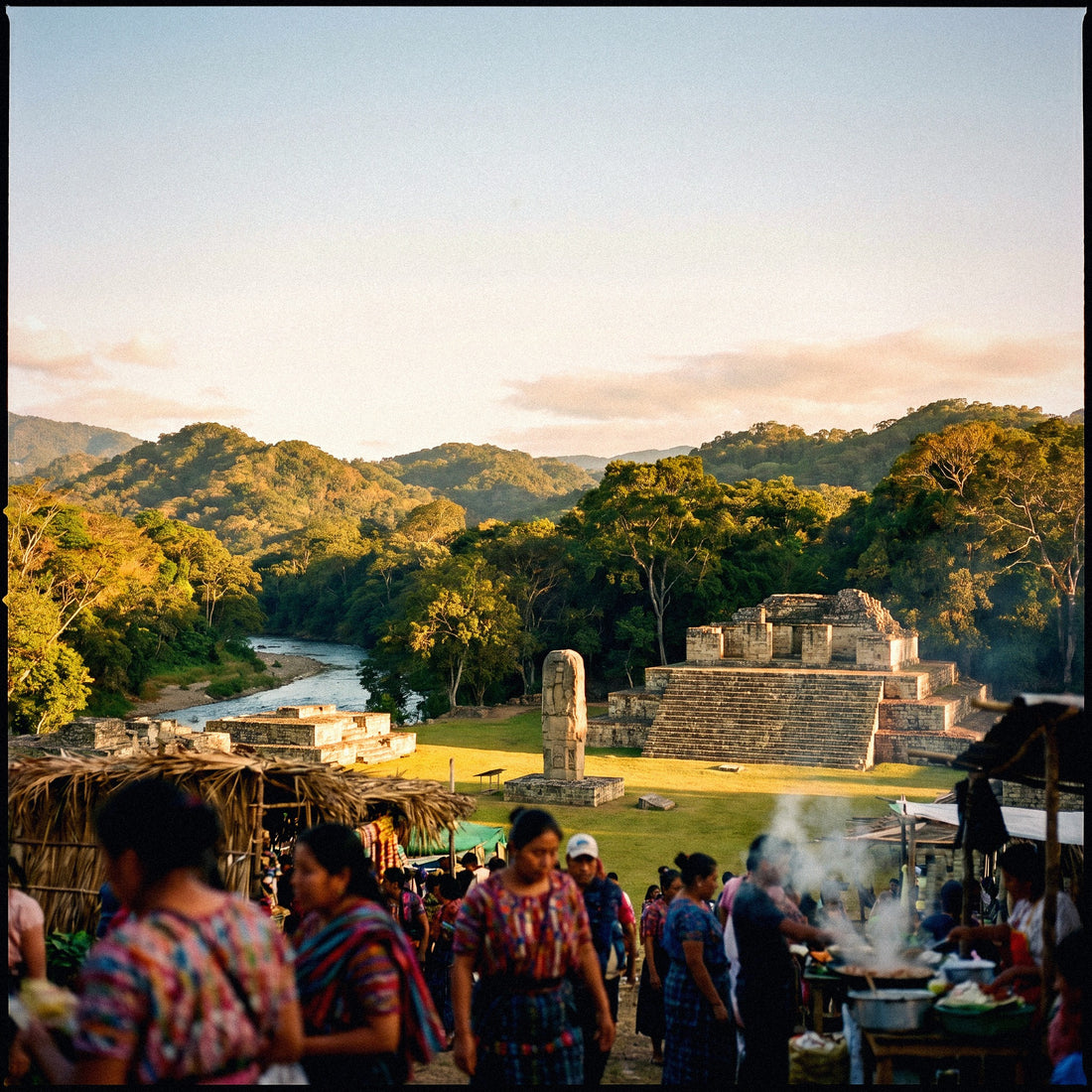
| Copán Ruins (visit) | Signal in town, weak at the site | Low: photos and little else |
| La Ceiba - Roatán Ferry (~90 min) | Wi-Fi on board and in terminals; signal only near coast | Almost zero |
| Roatán, resort areas and east of the island | Irregular; hotel Wi-Fi saturated | High: where you'll use data |
| Dives and boat trips | No signal, phone in locker | Zero |
Two practical tips. One: download the map of the area before leaving the hotel, because the road sections to Copán and through the interior are precisely where you need navigation the most and there's the least signal. Two: guided tours of Copán and diving days are entire hours without touching your phone, so don't inflate your package thinking about 12-hour connected days; they won't exist.
And a recommendation that has nothing to do with megabytes but with the trip: before traveling by road or booking night transfers, consult the official travel recommendations for Honduras from the Ministry of Foreign Affairs. They are up-to-date and free.
How to know your real consumption before leaving home
All of the above are averages. Your exact number is already in your pocket, and it takes two minutes to find. It's the only data that can't be wrong, because it's you.
On Android, go to Settings, Network & internet, SIM or Data usage, and check your usage for the last full month. On iPhone, Settings, Cellular Data: be careful, the counter there is cumulative since the last time you reset it, so set it to zero today and check it in a week for clean data. In both cases, you'll also see the breakdown by app, which is gold: it tells you who is eating up your megabytes.
With that monthly number, the formula is direct:
- Divide monthly consumption by 30 to get your daily average.
- Subtract what you spend on Wi-Fi at home and won't spend there (or add it, if you're hooked on Wi-Fi at home and won't have it there).
- Multiply by the number of travel days.
- Add a 20-30% cushion for the unexpected: a complicated transfer, a video that needs to be sent, a map that downloads automatically.
A real example: if you use 6 GB per month and half of it is at home with Wi-Fi, your mobile average is around 100 MB per day. For 10 days in Honduras, that's 1 GB... plus the specific extra for the destination. If you're going to dive and upload video, that's where you add the 8-10 GB difference. If not, you can see that 2-3 GB will cover you amply.
Tricks to stretch your data in Honduras
With four adjustments made before leaving home, the same package lasts almost twice as long. These aren't guru tricks: they are things you activate once and forget about.
- Offline maps of Roatán island, Copán, and the La Ceiba-San Pedro Sula corridor. Google Maps and Maps.me save them completely, and then you navigate with GPS, which doesn't consume data.
- Wi-Fi-only backups: Google Photos, iCloud, and Dropbox. This is the setting that saves the most gigabytes on a diving trip, without a doubt.
- Video quality at 480p on YouTube, Instagram, and TikTok, and autoplay disabled. Just this alone reduces consumption from 1 GB/hour to less than 300 MB.
- Data Saver mode activated in the system, which cuts background traffic from apps you're not using.
- Download in the hotel what you're going to consume during journeys: music, podcasts, the ferry series. Take advantage of good Wi-Fi hours, which in Roatán are usually early mornings.
- Spotify and music in normal quality, not high. The difference on travel headphones is imperceptible, and you save half the data.
I have a longer list with screenshots in the article on how to save data on a trip, but these six are more than enough for Honduras.
What happens if you run out (and why I prefer that over having too much)
I'll be clear, even if it's not commercially convenient for me: err on the side of having less. It's better to buy the small package and top up if needed than to pay in advance for gigabytes that will go unused and expire with the plan.
When you run out of data, nothing dramatic happens: the connection stops working, and you're left with the hotel, restaurant, or dive center Wi-Fi until you top up. And topping up today takes two minutes from your phone itself, without going to any store and without changing any settings; you just need to be on Wi-Fi for a moment. In Roatán, you have Wi-Fi in any bar in West End, so the real risk of being stranded is practically nil.
Overdoing it, on the other hand, is throwing money away with no return. And there's a psychological effect I see constantly: those who buy 20 GB use them, even if they don't need them. They leave the video on maximum quality, look at their phone on the terrace instead of looking at the sea. A tailored package forces you into good habits.
My rule for Honduras: buy for the realistic scenario, not for the worst imaginable. If you're debating between two sizes, choose the smaller one the first time; on your second trip, you'll know your exact number. And if the concept of virtual connection sounds like Greek to you, here I explain what an eSIM is in two minutes.
Frequently Asked Questions
The most common questions I get about data in Honduras, answered straightforwardly and without fuss.
How many GB do I need for a week in Roatán diving?
Between 8 and 15 GB if you're uploading underwater video daily; 5 GB is enough if you only upload photos. The difference is made by the material you share: one minute of 4K is 400-500 MB. Edit and upload only the good clip and you significantly reduce consumption.
Can I use the hotel Wi-Fi in Roatán and forget about data?
I don't recommend it as your only plan. Island Wi-Fi is usually barely adequate and gets saturated in the afternoon, just when the divers return. It's useful for downloading while you have breakfast or for backups in the early morning, but to move around the island you'll want your own data.
Is 1 GB enough for a cruise stopover?
Yes, more than enough. Six or eight hours on land with maps, WhatsApp, and a few photos rarely exceed 300-400 MB. The important thing is not the package size, but having your data turned off while on board to avoid touching the ship's satellite network.
Do I use more data in Copán or on the islands?
On the islands, by far. In Copán, you spend hours walking among ruins without looking at your phone and with patchy coverage on the way. In Roatán, you're in your room in the afternoon wanting to upload video with Wi-Fi that doesn't work. Peak consumption is there.
What if I run out of data halfway through my trip?
Recharge from your phone in two minutes with any Wi-Fi. You don't lose your number, you don't change settings, and you don't have to look for a store. That's why I always say it's better to start with a tailored package than to over-provision out of fear.
Is there coverage throughout the country?
No: good coverage is in cities and main tourist areas. Mountain roads, rural areas, and parts of the islands have irregular or no signal. This is another reason to have maps downloaded, but it also means that in those sections your consumption drops to zero.
Do I need more data if I travel with family?
Yes, but not by multiplying by the number of people. It's common to share a connection from a single phone: count the consumption of the highest user and add half for each companion. For 10 days with family, 10 GB is a comfortable figure.
Is it better to buy a regional package instead of one for Honduras?
Only if you're visiting several Central American countries on the same trip. If your itinerary is just Honduras, the country package is better priced per gig. For a multi-stop cruise, the regional package wins.
Conclusion
To summarize directly: 5 GB for ten days covers the vast majority of travelers going to Honduras. If your trip is for diving in Roatán with daily underwater video, go for 10-15 GB. If it's a cruise stopover, 1 GB and data off on the ship. And if you only use maps and WhatsApp, 2 GB is more than enough and I have no shame in telling you that.
Adjust with downloaded maps, backups on Wi-Fi, and video at 480p, and you'll see that the package lasts longer than you thought. When you have your number, get it here: eSIM for Honduras, activated in minutes and ready before you step foot on the ferry.