If you've already decided to buy data and just need to know how many GB you need for Guyana, I'll tell you straight: probably fewer than you think. Guyana is one of the few destinations where the trip itself forces you to disconnect for days at a time, and that changes the math completely. Here are the numbers, without padding them.
The direct answer: how many GB for Guyana
For a 10-day trip to Guyana, most people are fine with 3 GB. That sounds like very little for ten days, and it is: in Guyana you'll spend three or four full days without coverage, at Kaieteur and in the Rupununi. If you're working remotely from Georgetown, go up to 8 GB.
That's the honest answer, and I'm not going to hide behind tables and give it to you at the end. A typical trip to Guyana lasts between 7 and 10 days —internal flight logistics are expensive and complicated, so few people stay longer— and of those days, half are spent in places where your phone has absolutely nothing to do except take photos.
Compare that to a 10-day trip to Thailand or Mexico, where you're connected 100% of the time and where 5 or 8 GB barely cut it. In Guyana, the destination does the saving for you. If you want the general rule for any country, it's in the guide to how much data you need for travel; here I'm focusing on what's specific to Guyana.
One important note before we continue: running out of data in Guyana isn't a disaster because you can always top up once you're back in coverage in Georgetown. Overbuying, on the other hand, is money thrown away that you won't get back. That's why my recommendation deliberately leans low.
Why Guyana uses less data than almost any other destination
There are four concrete reasons the number drops in Guyana, and none of them are up for debate.
- It's the only English-speaking country in South America. English is the official language, so you skip something that eats hundreds of megabytes in Japan, Vietnam or Morocco: pointing your camera translator at every menu, every sign and every ticket. Here you just read it and move on.
- The interior has no coverage. No mobile signal and no Wi-Fi across most of the jungle, Kaieteur National Park and much of the Rupununi. It's not that you use little: it's that you use zero. Lodges and guides communicate by radio or satellite phone.
- There's no internet censorship. Unlike China or Iran, in Guyana you don't need a VPN running all day, which is a constant extra drain of 5-15% on top of whatever you use.
- The country is small in tourist terms. Few people, few long journeys with your phone in hand, and very little "airport scrolling" compared to a circuit around Europe.
The flip side is that when you do have signal, you'll use it hard: sending the "I'm alive" message home, uploading photos of the waterfall, confirming the next day's flight. If you also want to understand how the country's network works and which carriers exist, I break it down in the internet in Guyana guide, which is the sister article to this one. Here I'm sticking to the gigabytes.
How much each activity uses, in real numbers
Before you decide on a plan, it helps to know what eats your data. These are approximate, consensus figures measured under normal phone conditions; your actual usage may vary depending on video quality and screen size.
| Activity | Approximate usage | What it means in Guyana |
|---|---|---|
| Google Maps navigation | 5-10 MB per hour | Almost irrelevant, and it doesn't even work inland |
| WhatsApp text only | 1-3 MB per day | Your main use: you can text the whole trip on 30 MB |
| WhatsApp voice call | 25-35 MB per hour | Cheap: one 15-minute call a day is ~8 MB |
| Video call | 300-500 MB per hour | The silent killer. Half an hour a day = 7 GB in 10 days |
| Social media (feed and stories) | 100-150 MB per hour | Moderate use: about 200 MB per day |
| Reels and TikTok | 900 MB - 1.2 GB per hour | What really blows through any plan |
| Uploading 20 photos to the cloud | 60-100 MB | Guyana gives you plenty of photos: save it for Wi-Fi |
| Uploading a 1-minute video | 50-100 MB | Three videos of the waterfall = half a gig |
| Music streaming | 40-80 MB per hour | Download it beforehand: there's no signal on the plane anyway |
| Video at 480p | 500-700 MB per hour | Only if you have dead nights at the lodge |
| Email and web browsing | 20-50 MB per hour | Light work from Georgetown, very manageable |
The takeaway is always the same and boils down to one sentence: anything that isn't video is practically free. If you want the details on how these numbers are measured, I have a full article on mobile data usage statistics by activity.
Recommendation by traveler profile and trip length
This is the table you came for. It's calculated assuming a realistic trip to Guyana, meaning 30% to 50% of days with no coverage if you're doing the classic Georgetown + Kaieteur + Rupununi circuit.
| Traveler profile | 5 days | 10 days | 15 days | 30 days |
|---|---|---|---|---|
| Maps and WhatsApp tourist | 1 GB | 2 GB | 3 GB | 5 GB |
| Photos and social media | 2 GB | 3 GB | 5 GB | 10 GB |
| Family or couple sharing one phone | 3 GB | 5 GB | 8 GB | 12 GB |
| Digital nomad / remote work from Georgetown | 5 GB | 10 GB | 15 GB | 25 GB |
| Content creator uploading video daily | 8 GB | 15 GB | 20 GB | 40 GB |
Three things to keep in mind when reading it. First: if your trip is Georgetown and the coast only — for work, oil business, visiting family — add 50% to your row, because you'll be connected every day with no jungle days to balance it out. Second: if it's a pure expedition trip, with five or six straight nights in Rupununi or Iwokrama lodges, you can drop down a whole tier.
And third, the one I care about most: nobody has ever come back ruined from buying 3 GB instead of 10. The expensive mistake is the other way around. If by day five you're running low, top up from your phone in two minutes while you're having dinner in Georgetown and you're set.
The disconnection map: where you'll use data and where you won't
Guyana isn't a country with "good" or "bad" coverage — it's two different countries stuck together. The coastal strip, where the vast majority of the population lives, has 4G from GTT and Digicel that works reasonably well. The other 90% of the territory is jungle, and there's no network to speak of.
| Area | Mobile coverage | Wi-Fi | Typical daily usage |
|---|---|---|---|
| Georgetown and the coast | Decent 4G | Yes, in hotels and cafés | 150-400 MB |
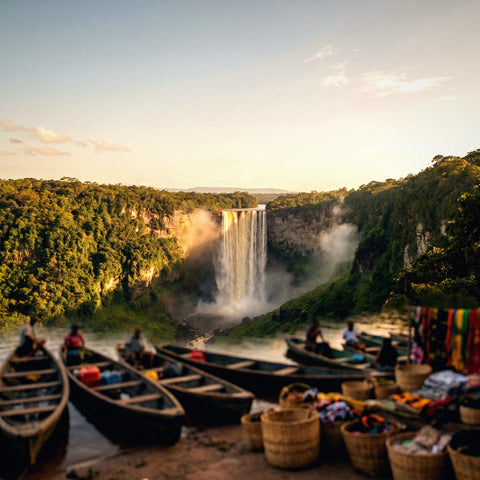
| Flight and visit to Kaieteur | None | None | 0 MB |
| Iwokrama and Essequibo River | Virtually none | Occasional and satellite-based | 0-50 MB |
| Rupununi and remote lodges | Isolated, only near villages | Sometimes, slow and only near the main building | 0-100 MB |
| Lethem (border with Brazil) | Acceptable 4G | Yes | 200-400 MB |
| Bartica and inland rivers | Patchy | Scarce | 50-150 MB |
In Guyana you don't choose to disconnect — you get disconnected. Guides carry a radio or satellite phone because it's the only communication that works out there. Accept it before you leave and let people at home know you'll be unreachable for two or three days.
With this table in front of you, doing your own math is trivial: multiply the days on the coast by 300 MB, add zero for each day inland, and throw in a 30% buffer. You'll end up with a small number, and that's fine. If you want to see what plans are available and how to activate them, I explain it in the Guyana eSIM guide. I'd save the budget for the bush planes — those really hurt.
Georgetown and the coast: this is where your gigs go
All your real data usage happens on the days you're in the city, so it's worth looking at them closely. In Georgetown you'll use your phone for four very specific things.
- Coordinating logistics. Inland bush planes change schedules, get delayed by weather, and get confirmed at the last minute. You'll be having WhatsApp conversations with your tour operator almost daily. Cost: trivial, just a few megabytes.
- Getting around. There's no ride-hailing app ecosystem here like in other countries in the region; the norm is still a trusted taxi the hotel calls for you, by phone or WhatsApp. That means less app usage, but also that you want to have credit and data exactly when you need them.
- Uploading your stuff. This is 70% of your data spend. After three days without signal, your phone tries to sync all photos and videos at once as soon as it catches a network. If you don't control it, you'll burn through a gig in twenty minutes without doing anything.
- Normal life. Email, banking, news, a show at night.
Point three is what ruins people's calculations, and it's totally avoidable: just set your backups to "Wi-Fi only" before you leave home. The Wi-Fi at Georgetown hotels is more than enough for that, though it's best not to rely on it completely because power cuts are part of the landscape and a night can leave you without service.
Calculate your real usage before you leave home
Everything above is an average. Your exact number is already in your pocket, and checking it costs nothing. It's the most useful tip in this article, and I'm not making it up: it's your own data.
On Android, go to Settings → Network & Internet → SIM or Data usage and check the usage from your last complete billing cycle. On iPhone, go to Settings → Cellular and scroll down to the per-app breakdown; note that the counter there is cumulative since you last reset it, so look at the date at the very bottom.
With that number, do this calculation, which is the one I use:
- Divide your monthly usage by 30 to get your daily average.
- Subtract between 30% and 50%, because at home you use data in places where in Guyana you'll have hotel Wi-Fi or nothing at all.
- Multiply it only by the days you'll be in areas with coverage, not by your total travel days.
- Add a 25% buffer and round up to the next package size.
Real example: if you use 12 GB per month in your home country, your average is 400 MB per day. Subtract 40% and you get 240 MB. If out of your 10 days in Guyana six have coverage, that's 1.44 GB; with the buffer, 1.8 GB. You round up and go for a 2 or 3 GB package. That's your number, and notice how far it is from the 20 GB they'll try to sell you by default.
How to stretch your data in Guyana
With these tweaks, made before you board the plane, a small package will last your whole trip without you feeling like you're rationing.
- Download offline maps of Georgetown. Google Maps lets you save specific areas; do it for the city, the coast, and the Lethem area. Keep in mind that the interior is very poorly mapped, so for the jungle and savannahs, trust your guide and the vehicle's GPS, not your phone.
- Backups over Wi-Fi only. Google Photos, iCloud, WhatsApp, and Drive — all four. This is the single setting that saves the most data.
- Turn off autoplay for video on Instagram, X, Facebook, and TikTok. Doing only this cuts your social media usage by more than half.
- Activate system Data Saver (Android) or Low Data Mode (iPhone). This limits background activity, which is data you never see or enjoy.
- Download entertainment before you leave. Music, podcasts, and a couple of movies. You'll have hours of 4x4 travel, waiting at the Ogle airstrip, and hammock time at the lodge with zero signal.
- Set video quality to 480p by default. On a phone screen the difference is barely noticeable, and the savings are three or four times.
I have a full list with more tips in this data saving guide. If you only apply two, make them backups over Wi-Fi and autoplay: together they save you more than half the data usage of a normal trip.
What happens if you run short (and why that's better than overbuying)
Let's tackle the underlying fear: running out of data in the middle of the Guyanese jungle. The reassuring answer is that in the Guyanese jungle you won't have data anyway, whether you have 3 GB or 30 in your account. Out there, the package is irrelevant.
When your package runs out, you simply stop browsing. There are no surprise bills or overage charges — it cuts off, period. Recharging takes a minute from your phone as soon as you have coverage or hotel Wi-Fi, and the new balance kicks in immediately without changing anything on your device.
Compare the two possible mistakes:
| Scenario | What it costs you | How to fix it |
|---|---|---|
| You run short | A few minutes of management and the cost of the top-up | Recharge from the hotel or airport, instantly |
| You overbuy | Money you paid and didn't use, and that expires | No fix: it's a direct loss |
That's why I always say the same thing: buy the package the table tells you to, not the next one up. And if it gives you peace of mind, familiarize yourself with the recharge process before you fly so you don't have to learn it in a hurry. To understand how everything works behind the scenes, check out the explanation in what is an eSIM, but for traveling you don't need to know anything technical: you scan a QR code and you're done.
Frequently asked questions
How many GB do I need for 7 days in Guyana?
2 GB is enough for a week in Guyana if you do the classic circuit with Kaieteur and one night in the interior. Out of those seven days, two or three will be spent without coverage, so the real usage is concentrated over four or five days in Georgetown. If you work remotely, plan for 5 GB.
Is there coverage at Kaieteur Falls?
No, there's no mobile signal or Wi-Fi at Kaieteur. You get there by small plane from Georgetown; the falls are in the middle of the National Park with no network infrastructure. You'll spend around two hours there completely disconnected. Take your photos and upload them when you get back to the city.
Do the Rupununi lodges have Wi-Fi?
Some do, but it's slow, satellite-based, and usually only works near the main building. Don't count on it for video calls or uploading video. Confirm the specific situation with your lodge before you arrive if you absolutely need to stay connected for work.
Is it worth buying a big package just in case?
No, and in Guyana that's truer than for any other destination. Days without coverage don't use anything, so a large package almost certainly ends up half-used. Buy small and top up if you need to: a top-up takes a minute and you don't lose what you already have.
Do I need a camera translator app in Guyana?
No, and that saves you quite a few megabytes. Guyana is the only English-speaking country in South America: English is the official language and all signs, menus, and documents are in English. This is an expense that eats up hundreds of megabytes in other destinations and simply disappears here.
What if two of us are traveling, do we buy two packages?
It depends on whether you'll share a connection. The most practical approach is a slightly larger package on one phone and sharing it via a hotspot when needed, especially for maps and messaging. With 5 GB for ten days, a couple is more than fine if the second phone only uses data occasionally.
Can I use my phone to call Guyanese numbers?
Data packages are usually just that — data, with no local number for traditional calls. In practice it doesn't matter: hotels, guides, and tour operators in Guyana use WhatsApp, and a voice call over WhatsApp uses about 30 MB per hour, nothing.
How much time will I actually be disconnected?
Between 2 and 5 days of a typical 10-day trip, depending on the itinerary. A full day at Kaieteur, plus nights at Iwokrama or on the Rupununi ranches. It's not a flaw in your plan — it's just what happens when you travel to the Amazon rainforest and the savannahs, and it's a good idea to let people back home know before you head out.
Conclusion
My recommendation for Guyana, no frills: 3 GB for ten days if you're doing the standard Georgetown, Kaieteur, and Rupununi loop. 2 GB if your trip is short or mostly deep in the interior. 8 or 10 GB only if you're remote-working from the coast or uploading video daily. Anything above that is, practically speaking, money you're giving away.
Guyana is a destination where the honest answer stings a little: you'll spend a fair number of hours without signal, and no data package can fix that. The good news is that works in your favor on price. Start small, top up if you need it, and put the savings toward the bush planes — that's where your travel budget really goes on this trip.
When you're sure, here's the Guyana eSIM ready to activate before you leave home, so you land in Georgetown already connected and without hunting for a phone store at odd hours.